


Storm Guard - Weather Radar
4.191.00 Reviews
App Specs
- Version
- 1.60
- Updated On
- License
- Free
- Downloads
- 10,000+
- Developer
- Kernalite
- Categories
- Weather
- Platform
- Android
Screenshots
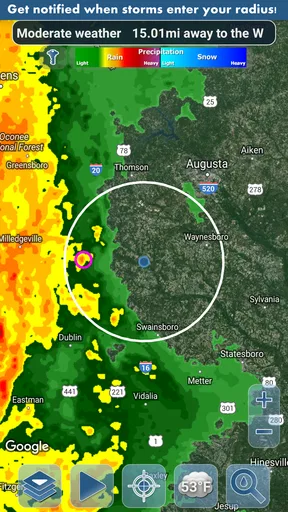
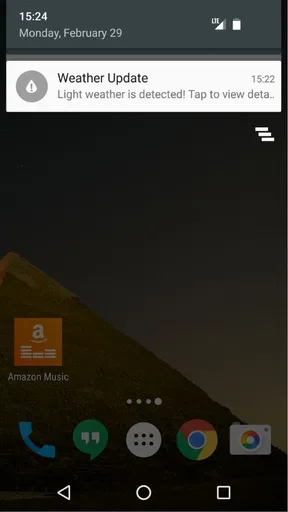
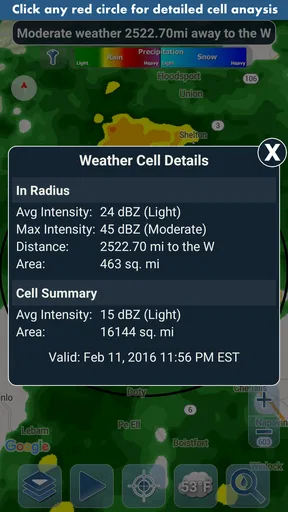
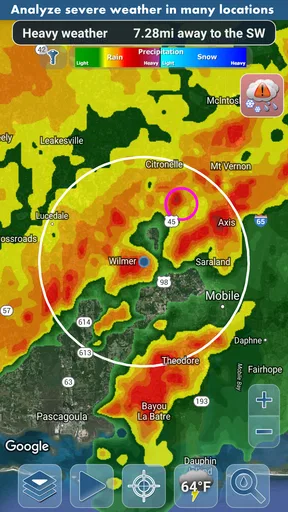
 Analysis by AppCompare
Storm Guard - Weather Radar is the kind of weather app I would install when a normal forecast feels too vague. Its focus is not simply telling me whether the day will be warm or cold; it is built around rain and snow detection notifications, with storm analysis intended to help me react before conditions change. I reviewed it as a practical weather tool rather than a replacement for every forecasting service, and that distinction matters. It can be useful when timing is more important than a long list of forecast details, but it also asks for a little patience during setup and interpretation.
Developed by Kernalite, this free weather app sits in the everyday weather category and is rated for Everyone. It has reached over ten thousand installs and holds a 4.1 average from more than a hundred ratings, with fewer than a hundred written reviews. Those numbers suggest a modest, focused app rather than a huge all-purpose platform. The current version is 1.60, and the app requires Android 10 or newer. Optional purchases cost $0.99 per item, so the basic download is free while some extras may involve a small payment.
Getting past the first setup hurdles
The first place I would expect users to get stuck is not the weather information itself, but the relationship between location, notifications, and timing. A rain alert is only useful if the app knows which place to watch and can deliver the message when it matters. If the chosen location is wrong, outdated, or too broad for the situation, the app may appear inaccurate even when the underlying observation is reasonable.
I recommend beginning with one familiar location instead of immediately trying to monitor several places. Use the place where you normally spend the day, then check whether the displayed conditions make sense before relying on alerts. This simple approach separates a location-selection problem from a forecasting problem. If the app is watching a former home, workplace, or travel destination, every later notification becomes difficult to judge.
Notifications deserve a deliberate check as well. On a modern Android device, notification controls can be managed at the system level, and battery-saving behavior can affect apps that need to notify you at a particular moment. I would open the device settings for Storm Guard and confirm that notifications are allowed. If the phone offers battery restrictions for individual apps, I would avoid an aggressive restriction while testing the alert behavior. This is not a guarantee that every alert will arrive perfectly, but it removes one of the most common sources of confusion.
The most useful setup habit is to test the complete path before a stormy day. Do not wait until you are leaving for an outdoor event to discover that notifications are blocked. Run the app in ordinary conditions, confirm that the selected location is correct, and observe how it presents changing weather. The goal is not to manufacture a false alert; it is to learn where the app displays information and whether the phone is willing to show notifications from it.
Another practical point is Android compatibility. Because the app needs Android 10 or later, an older phone may not be a suitable candidate even if it still handles other weather apps. This requirement is easy to overlook when someone is helping a family member install it. Checking the operating system first saves time and avoids blaming the app for a compatibility issue.
Worth Reading Before You Choose

Flipboard Shows What News Apps Must Do Beyond the Feed

Switching to Android Auto Means Rethinking Your Driving Routine

Google Calendar Makes a Crowded Week Easier to Manage

Ludo King Makes the Most of the Minutes Between Plans

Baby Panda World Brings Quick Play to Modern Phones, but Its Game Library Feels Busy

ESPN’s Live Game View Makes Following Close Games Easier
What the alerts are good at in daily life
I see the strongest use case in short decisions: whether to start a walk now, move laundry indoors, delay a bicycle trip, or take an umbrella before leaving. A standard weather app often gives an hourly forecast, but an alert centered on detected rain or snow can be easier to act on. It turns the question from “What might happen today?” into “Is something approaching that should change my next decision?”
Imagine I am preparing to leave for work and notice that the sky is still dry. A general forecast may show a chance of rain later, while Storm Guard can serve as a closer watch for rain or snow activity. I would still use common sense and look outside, but the notification could prompt me to pack a jacket or postpone a short errand. That is a small benefit, yet it is exactly the kind of benefit that makes a focused weather app worthwhile.
For snow, the same workflow can help with timing, but I would be more cautious about treating a notification as a complete travel assessment. Snow conditions can change the safety of roads and sidewalks in ways that a simple alert cannot summarize. I would use the app as an early signal, then check local road information or a broader forecast before making a longer journey.
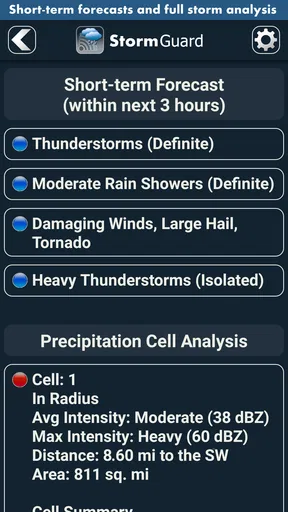
The storm analysis angle is also more useful when I treat it as context rather than a promise. Weather systems are messy, and an approaching shower can weaken, split, or miss a particular street. The app may help me pay attention to a developing situation, but I would not use one notification as proof that a storm will arrive at an exact minute. That expectation is likely to create disappointment with any weather service, not only this one.
Recovering when the workflow seems broken
If I stop receiving notifications, I would troubleshoot in a fixed order rather than reinstalling immediately. First, I would open the app and check the selected location. Next, I would inspect the phone’s notification settings. After that, I would look at battery-saving controls and confirm that the app has not been placed under unusually strict background limits. Finally, I would restart the app and the phone if the behavior remains inconsistent.
This order matters because reinstalling can hide the original cause without teaching me what went wrong. It may also force me to repeat the location and notification setup. A controlled check is faster when the problem is simply a blocked notification channel or an unsuitable device setting.
If the app shows information but the alert arrives late, I would compare the phone’s behavior with the app’s open-screen behavior. If the information updates while I am looking at it but notifications are absent in the background, the likely area to investigate is the operating system’s notification or power management. If the displayed weather itself looks questionable, I would compare it with what I can see outside and with another trusted source. That comparison does not automatically prove which service is right, but it helps identify whether the issue is delivery or interpretation.
When conditions are changing quickly, I would also avoid making a judgment from a single moment. Open the app again after a short interval and see whether the situation is developing in a consistent direction. A weather alert is most useful as part of a sequence: notice the signal, check the local sky, reconsider the plan, and verify again if the decision has real consequences.
There is a useful distinction between an app problem and a phone problem. If every other application is also failing to show notifications, the handset or its system settings deserve attention first. If only Storm Guard is affected, then its own notification configuration and location choice are the better starting points. This approach is less frustrating than assuming the forecast engine is broken whenever an alert does not appear.
When Storm Guard is not the right tool
I would not make this my only weather source for detailed planning. People who need extended forecasts, climate charts, radar layers, severe-weather bulletins, marine information, aviation details, or highly specialized outdoor data may prefer a broader service. Storm Guard’s appeal is its focused attention on rain, snow, and storm-related awareness. A full-featured weather platform will usually be a better companion when the decision depends on several kinds of information at once.
It may also be a poor fit for someone who dislikes notifications. The app’s value is closely tied to being told about changing precipitation conditions, so a user who keeps all alerts disabled will lose much of the reason to install it. In that case, a quiet forecast widget or a manual weather check may feel less intrusive and more suitable.
People using an older Android device should skip the installation attempt if the phone does not meet the Android 10 minimum. Likewise, anyone expecting perfect street-level certainty should adjust expectations before depending on it. Weather detection can be helpful without being exact enough to replace judgment, especially around fast-moving storms or patchy showers.
The optional purchase model is another small consideration. The app is free to start, but some items cost $0.99 each. I would explore the free experience first and only pay for an extra if I understood what it added to my routine. A low individual price is not automatically a good value if I rarely use the related function. On the other hand, for someone who checks precipitation frequently, a modest optional purchase may be reasonable if it improves the way the app fits their needs.
How it compares with ordinary weather alternatives
Compared with the weather screen already included on many phones, Storm Guard feels more purpose-driven. Built-in weather tools are convenient because they are already present and often cover broad forecast information. Storm Guard is more attractive when I want rain or snow activity to be the center of attention rather than one line in a general forecast.
Compared with a large weather service, it is easier to understand as a companion than as a complete replacement. A larger service may offer more layers, longer outlooks, and more ways to investigate a storm. Storm Guard’s advantage is a narrower workflow: choose a location, watch for precipitation-related changes, and use the alert to decide what to do next. That simplicity can be a strength for casual users, but it can feel limited to someone who wants to analyze every detail.
The trade-off is especially clear during serious weather. I would use Storm Guard to increase awareness, then consult official local guidance if authorities issue warnings or if travel conditions become unsafe. No notification-focused app should be treated as the sole source for emergency decisions. The app can prompt attention; it should not replace responsible checking.
Small habits that make the app more useful
My first tip is to choose notifications based on decisions, not curiosity. If every possible message is enabled, the phone can become noisy and the important alert may blend into ordinary activity. I would keep the setup tied to situations where rain or snow genuinely changes my plan, such as commuting, walking a dog, exercising outdoors, or protecting items left outside.
My second tip is to pair the alert with a physical check. Look at the sky, the street, and the direction of visible clouds before leaving. This is not a criticism of Storm Guard; it is a sensible way to use any precipitation detector. The app provides a prompt, while local observation provides immediate context that no phone screen can fully capture.
My third tip is to record what happened mentally after a few real alerts. Did the message arrive early enough to help? Did it correspond to rain at your location, or was the weather patchy? Was the notification useful during work, sleep, or travel? After several ordinary experiences, I would know whether the app fits my area and routine better than a generic forecast. That personal calibration is more valuable than assuming every weather tool performs identically everywhere.
A fourth useful habit is to avoid repeatedly changing the location while troubleshooting. If I switch places, notification settings, and battery controls all at once, I cannot tell which change helped. I would make one adjustment, observe the result, and continue from there. This is particularly helpful for a family member who wants simple guidance rather than a long technical explanation.
My practical verdict
After using Storm Guard - Weather Radar as a focused weather companion, I would recommend it to people who want timely awareness of rain and snow without turning weather checking into a research project. The free starting point makes it easy to try, and the emphasis on notifications gives it a clear purpose. Its 4.1 average from over a hundred ratings reflects a generally positive reception, while the more modest install base suggests that it remains a specialized choice rather than a universal default.
I would install it on a compatible Android phone, select one dependable location, and spend a little time checking notification behavior before trusting it for an important plan. If alerts become part of a useful routine, the app can save small amounts of time and help avoid getting caught unprepared. If I needed detailed forecasting, official warnings, or extensive weather layers, I would keep a broader service available as well.
My final view is favorable but measured: Storm Guard works best as an early-warning layer for everyday precipitation decisions, not as a complete weather authority. Users who understand that role are likely to get the most from it. Users expecting exact storm timing, extensive forecasting tools, or a completely hands-off setup may be happier with another option. For the right routine, though, Kernalite’s compact weather app offers a practical reason to pay attention before the rain or snow arrives.
Pros
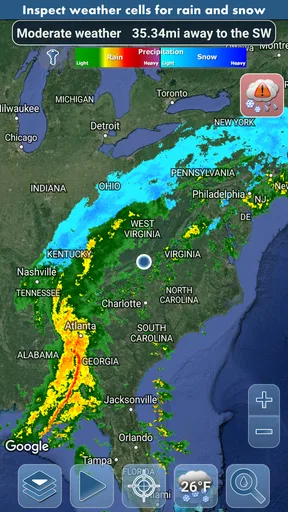
- Detailed radar maps help track approaching rain and storms.
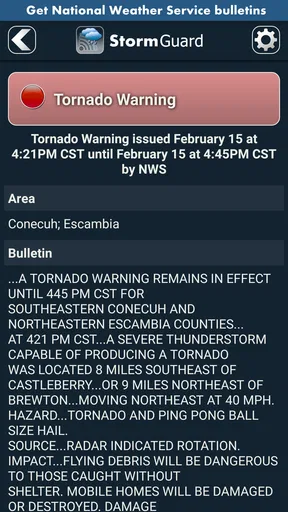
- Severe weather alerts can provide useful advance warning.
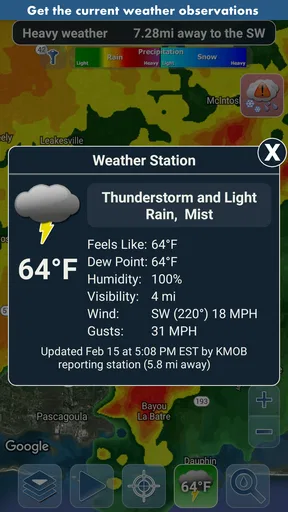
- Multiple weather layers make local conditions easier to understand.
- Clean interface allows quick access to radar and forecasts.
- Useful for planning outdoor activities around changing weather.
Cons
- Some advanced radar features may require a paid subscription.
- Radar imagery can be delayed during rapidly changing conditions.
- Frequent alerts may feel excessive in areas with unstable weather.
- Battery and data usage can increase when tracking storms continuously.
- Forecast accuracy may vary significantly by location.
FAQs for Storm Guard - Weather Radar
What is Storm Guard - Weather Radar used for?
Storm Guard - Weather Radar is designed to help you monitor current weather conditions and follow approaching storms through radar-based maps. It can be useful for checking rain, thunderstorms, severe weather areas, and forecast changes before commuting, traveling, exercising outdoors, or planning events. The app is best treated as a convenient information tool rather than a replacement for official emergency alerts.
Does Storm Guard - Weather Radar provide real-time weather radar information?
The app is built around weather radar and typically presents precipitation activity, storm movement, and related weather details on an interactive map. Radar updates may depend on your internet connection, location, data provider, and the app’s update schedule, so information may not appear instantly. For dangerous conditions, always compare the app with official warnings from your national weather service or local authorities.
Does Storm Guard - Weather Radar require location access?
Location access is generally useful because it allows the app to center the radar map on your current position and provide more relevant local weather information. You may be able to search for places manually if you prefer not to grant location permission. Keep in mind that disabling location services can make the experience less convenient, while allowing access may raise privacy considerations that you should review in the app’s permission settings.
Is Storm Guard - Weather Radar free to download and use?
The availability of free features, advertising, subscriptions, or optional in-app purchases can vary depending on the version and the platform where you download Storm Guard - Weather Radar. Before installing, check the official Google Play or App Store listing for current pricing and subscription details. Pay particular attention to trial periods, automatic renewal terms, and which radar or alert features are restricted to paid users.
Can Storm Guard - Weather Radar replace official emergency weather alerts?
No. A radar application can make it easier to visualize storms and follow changing conditions, but it should not be your only source of safety information during severe weather. Notifications may be delayed, unavailable because of connectivity problems, or limited by device permissions and regional coverage. When a storm threatens, follow official emergency alerts, local weather services, and instructions from public safety authorities.


